Thursday, 25 June 2015

appeals, malpractice


questionnaire feedback
1.) What do you think the message of our Animation is ?
In my opinion i believe that the animation that you have created gives off the message that people appreciate what children in need do for the families and people who have been affected.
2.) What do you think is the best bit of the Animation ?
I personally think the best bit is when pudsey kicks the ball over the post for a conversion. it gives off a sense of success and achievement.
3.) What would you improve if you could?
The only thing i would improve if i could would be the length of the advert, i would love to learn more about this character and understand what she went through during her service within the Army.
4.) Would you like to see this on TV.
I would love to this this on TV, i believe that many people after seeing this advert will realise how important children in need is and what they do for those in need.
5.) What do you think the message of our Animation is ?
I believe that the message from the Animation you have created is to show the viewers what children in need stand for and what they do to support those children who need help
6.) What do you think is the best bit of the Animation ?
I think the best part of the animation is the character competing in the race at the end of the video. The reason why i like this part so much is because it shows how Help for Heroes supported this person after being hospitalised to the point where they have regained full health and is competing within a race. It lets the viewers understand the amount of hard work and support that the charity go through for those in need.
7.) What would you improve if you could?
The only thing i would improve would be to show pudsey spending more time with the england rugby team.
8.) Would you like to see this on TV.
Yes, i think by having this shown on TV it will raise the awareness of children in need and help them gain the recognition that they deserve.
In my opinion i believe that the animation that you have created gives off the message that people appreciate what children in need do for the families and people who have been affected.
2.) What do you think is the best bit of the Animation ?
I personally think the best bit is when pudsey kicks the ball over the post for a conversion. it gives off a sense of success and achievement.
3.) What would you improve if you could?
The only thing i would improve if i could would be the length of the advert, i would love to learn more about this character and understand what she went through during her service within the Army.
4.) Would you like to see this on TV.
I would love to this this on TV, i believe that many people after seeing this advert will realise how important children in need is and what they do for those in need.
5.) What do you think the message of our Animation is ?
I believe that the message from the Animation you have created is to show the viewers what children in need stand for and what they do to support those children who need help
6.) What do you think is the best bit of the Animation ?
I think the best part of the animation is the character competing in the race at the end of the video. The reason why i like this part so much is because it shows how Help for Heroes supported this person after being hospitalised to the point where they have regained full health and is competing within a race. It lets the viewers understand the amount of hard work and support that the charity go through for those in need.
7.) What would you improve if you could?
The only thing i would improve would be to show pudsey spending more time with the england rugby team.
8.) Would you like to see this on TV.
Yes, i think by having this shown on TV it will raise the awareness of children in need and help them gain the recognition that they deserve.
consideration of camera
Within animations there can be a variety of different camera shot. Each shot will have different kind of movements within the animation.
To shoot our animation we have placed the camera on a clamp and then positioned the camera over piece of paper where my animation will be taking place. We had to consider many different variables that may occur during the filming of our animation.
We have decided to place the camera above the table surface by using a clamp, this has allowed us to place the drawn out animation underneath. having the clamp has allowed us to place our animation on a flat surface. this has helped us as now we don't have to stick the cut out onto a wall and have the risk of them falling off. With the animation being filmed on a flat surface there is a less risk of the cut outs to move drastically.
As we have decided to place the camera above the worktop we now have to consider the different effect that the camera will do due to various different surroundings.
As the camera is above the animation then the lighting in the room may cause the camera to cast a shadow onto the animation, we had to overcome this by changing the positioning of the camera so there was no shadow over the top. we had moved away from any windows and waited for it go to dark before filming, this reduced the risk of the lighting being changed throughout the filming process.
Another issue that we would have to consider throughout the filming of our animation would be the solidarty of the stand and the camera that is placed in the stand. we had to make sure that the camera would stay in one place so there is no movement while filming. We had to firmly put in place the stand with various different weights to make sure it didn't move or even fall over. If we did this wrong then the camera could fall and brake and then also ruin our animation.
The last thing we had to consider was how we was actually going to film the animation, we didn't want any shadows of the person filming, or even the whole animation moving when we change the scene. We have decided to place down masking tape so each time that we changed the scene we would know where to exactly place the piece of A4 paper. when filming we all moved clear out of the lighting and stepped to one side. the prevents lighting change and also other body parts being in the camera shot.
To shoot our animation we have placed the camera on a clamp and then positioned the camera over piece of paper where my animation will be taking place. We had to consider many different variables that may occur during the filming of our animation.
We have decided to place the camera above the table surface by using a clamp, this has allowed us to place the drawn out animation underneath. having the clamp has allowed us to place our animation on a flat surface. this has helped us as now we don't have to stick the cut out onto a wall and have the risk of them falling off. With the animation being filmed on a flat surface there is a less risk of the cut outs to move drastically.
As we have decided to place the camera above the worktop we now have to consider the different effect that the camera will do due to various different surroundings.
As the camera is above the animation then the lighting in the room may cause the camera to cast a shadow onto the animation, we had to overcome this by changing the positioning of the camera so there was no shadow over the top. we had moved away from any windows and waited for it go to dark before filming, this reduced the risk of the lighting being changed throughout the filming process.
Another issue that we would have to consider throughout the filming of our animation would be the solidarty of the stand and the camera that is placed in the stand. we had to make sure that the camera would stay in one place so there is no movement while filming. We had to firmly put in place the stand with various different weights to make sure it didn't move or even fall over. If we did this wrong then the camera could fall and brake and then also ruin our animation.
The last thing we had to consider was how we was actually going to film the animation, we didn't want any shadows of the person filming, or even the whole animation moving when we change the scene. We have decided to place down masking tape so each time that we changed the scene we would know where to exactly place the piece of A4 paper. when filming we all moved clear out of the lighting and stepped to one side. the prevents lighting change and also other body parts being in the camera shot.
annotated screen grabs for animation


My animation is slow due to each picture to be shown for a too long of a period. to make my animation flow better i had to change the duration of each clip. once i selected all the clips, i changed the duration to about one 8th of a second. this made my animation run a lot smoother and give it a good flow.
Now that my animation run smoothly and looks like a video. I wanted to add different sounds effect to go with what is happening within the animation. i added various different sound effect such as footsteps, car skid, explosion, car door shutting. i have put these sound effect in to give a better understanding to the viewer on what is going on.
I added various different sound effects but some had to overlap each other. Such as the park scene I have birds singing, footsteps and also a dog barking. I have added these three sounds effect in as I wanted to show and give a realistic sense to the location.
I have put in many different sound effect to give the sense of what is happening and where it is happening. But I also want to give more emotion within the animation, so i have decided to add a sad moving music at the start to set the mood for the animation and then to finish it of throughout my last couple of scenes i wanted to give a better emotion, setting the mood That help for heroes does a good job.
visual editing guide


Clips
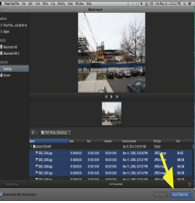
When starting an animation, you need to import all the clips you need. So, at the top of the window, click a tab saying 'file' where it should drop down and show options. There will be a option saying 'import' then that will also give you more options where one will say 'media'. This will take you to a small window where you can start browsing files for your clips to import them. Once you have selected all your footage, click the button saying 'import selected' and from here your footage will be ready to edit.
Laying on the timeline
When your footage is on the timeline, there are a few options on how you can edit. The first option is simple but can be long as you have to drag each clip to their correct position on the timeline and get them into the correct order. The second option is to go to the top of the window and select the tab 'edit' then 'select all' this then means that all the footage will be highlighted and drag all the selected clips and move them into the correct position.
Cutting
When trying to cut down your clips to the right length. Sometimes this can be a long process as you need to select modify at the top of the window and then select 'change duration'. This will help you later the size of the clips.
Transitions
With final cut, you can add transitions to the animation to make it look more professional. How to do this is by going to the top and selecting 'edit' then 'effects' and then 'video transitions'. There are plenty of options from fades to wipes to dissolves to shapes.
Adding sound effects and music
When choosing to add sound effects and music to your animation you do this the same way as you didi when importing the images. Once imported the selected sounds and music, all you need to do is drag it underneath the footage so it plays at the same time as the clip.
Exporting the document
When exporting your movie you need to go to "file" then down to "Export" then you want to export it as a quick time movie and then you can save it to your desktop so that it is easy to access.
team meeting minutes
During this meeting we discussed a number of different topics that needed to be completed during the following weeks ahead. Between us we divided the work into 3 different sections.
Harry : Filming, editing and creating the animation.
Olly : Story Ideas and planning.
harry and olly : Sounds effects and lighting.
Once we sorted out what everyone was doing, we started to work on making the animation relate to our charity children in need. We originally was going to use lego to create our animation but we then soon realised that we needed to take a more "serious" approach to the animation, so we all came up with the idea to use paper cut out animation. Baring this in mind we had to make sure we made the animation clear to understand what the charity does and what they stand for, we discussed a number of different ideas which all seemed good at the time but we soon finally settled down with one strong idea which we believe represents children in need in the best way possible.
After deciding on our idea, we then had our own jobs to do (as listed above). Each of our jobs were vital in the process of creating this animation as they all rely on each other in order to create a successful animation. This meeting lasted roughly 10-15 minutes.
Harry : Filming, editing and creating the animation.
Olly : Story Ideas and planning.
harry and olly : Sounds effects and lighting.
Once we sorted out what everyone was doing, we started to work on making the animation relate to our charity children in need. We originally was going to use lego to create our animation but we then soon realised that we needed to take a more "serious" approach to the animation, so we all came up with the idea to use paper cut out animation. Baring this in mind we had to make sure we made the animation clear to understand what the charity does and what they stand for, we discussed a number of different ideas which all seemed good at the time but we soon finally settled down with one strong idea which we believe represents children in need in the best way possible.
After deciding on our idea, we then had our own jobs to do (as listed above). Each of our jobs were vital in the process of creating this animation as they all rely on each other in order to create a successful animation. This meeting lasted roughly 10-15 minutes.


pitch feedback for animation
Pros:
We have shown development within our decision of our animation, we first was going to use lego however, we have shown that using lego show make our animation look like we wasn't taking it serious enough, so we have shown development of wanting to change our original idea to paper cut outs, as we felt it best suited the charity and would be the most effective way.
We have shown a clear understanding of the background of children in need, and have shown good research building up to the creation of our animation.
We was able to explain the purpose of children in need and give examples of what they do. Within our chosen idea we have given a clear understanding of what the charity does.
We have clear understanding of who our characters are and what they are doing within our animation. we have shown good detailed illustrations with some explanation of who they are and what role they were doing.
We have given a clear understanding of what Mise-en-scene is and how it is involved in our animation we have clearly described what effect we are using and the props lighting and costumes that will be used in our animation.
Cons:
The concept of our idea wasn't correct the first time we came up with ideas due to us not having a full understanding of Help for Heroes. We have improved this by researching Help for Heroes in more detail and then we have chosen to use a life story of a wounded soldier. This has helped us come up with more ideas that tell a better story and relate to Help for Heroes the best.
Within our storyboard we have given a good visual look however there isn't any writing to also explain in more detail about the camera angles and what is happening. we have used the same storyboards but underneath each drawing we have added in the camera angle and also what is occurring within the frame.
We didn't explain who the target audience was we was aiming for so and to improve we would need to show a full understanding of who the target audience is and who we are aiming it towards.
For our set designs it wasn't clear exactly what we was doing. we had explained our different sets we was going to use but wasn't explained in enough detail. To improve this we have now drawn out the set designs we are using and then underneath we have explained in detail why we are using them and in what part of the animation they will appear.
We have shown development within our decision of our animation, we first was going to use lego however, we have shown that using lego show make our animation look like we wasn't taking it serious enough, so we have shown development of wanting to change our original idea to paper cut outs, as we felt it best suited the charity and would be the most effective way.
We have shown a clear understanding of the background of children in need, and have shown good research building up to the creation of our animation.
We was able to explain the purpose of children in need and give examples of what they do. Within our chosen idea we have given a clear understanding of what the charity does.
We have clear understanding of who our characters are and what they are doing within our animation. we have shown good detailed illustrations with some explanation of who they are and what role they were doing.
We have given a clear understanding of what Mise-en-scene is and how it is involved in our animation we have clearly described what effect we are using and the props lighting and costumes that will be used in our animation.
Cons:
The concept of our idea wasn't correct the first time we came up with ideas due to us not having a full understanding of Help for Heroes. We have improved this by researching Help for Heroes in more detail and then we have chosen to use a life story of a wounded soldier. This has helped us come up with more ideas that tell a better story and relate to Help for Heroes the best.
Within our storyboard we have given a good visual look however there isn't any writing to also explain in more detail about the camera angles and what is happening. we have used the same storyboards but underneath each drawing we have added in the camera angle and also what is occurring within the frame.
We didn't explain who the target audience was we was aiming for so and to improve we would need to show a full understanding of who the target audience is and who we are aiming it towards.
For our set designs it wasn't clear exactly what we was doing. we had explained our different sets we was going to use but wasn't explained in enough detail. To improve this we have now drawn out the set designs we are using and then underneath we have explained in detail why we are using them and in what part of the animation they will appear.
crew roles for animation
Director: Harry Holland
Definition: he/she is the organizer and developer of the animation that they are trying to produce: I would organize and arrange the scenes and how I would like them to go
Producer: Oliver Friend
Definition: The Producer is frequently the first person to become involved in a project; they participate directly in all the main producing. Also they make the budget. :I Booked the cameras and organized the budget and also I made the changes that needed to be improved
Director of Photography (D.P.): Harry Holland
Definition: they are the heads of department on filming productions and have a leading role of approving thing: he is in charge of the filming and positing of the camera and redoing the scenes if needed
Editor: Oliver Friend
Definition: an Editor is someone who work’s closely with the Director, after the filming is completed, his is to assemble sots to piece together to make the final film. : I am in charge of the editing and making the advert all on final cut.
Camera Operator: Harry Holland
Definition: The Camera Operator sets-up positions and operates the camera. The right angels the film the right shots for the scenes. : He is in change of the cameras positions and also is in charge of the angles.
Minor Roles
Assistant Camera (A.C.): Harry Holland
Definition: assist the camera mad holding him when walking back so he doesn’t trip up and also helps him set up. : He is inchage of helping the camera man and helping him but giving advice.
Assistant Director (A.D.): Oliver Friend
Definition: he is his help man taking responsibility for number of important jobs due to the camera. He also needs to take care of the camera man when using the camera.
Art Director: Harry Holland
Definition: create all the set art work and makes the shots and sets look as good as they should do. : he is in charge of making the shot look good and making the space around the shot even
Casting Director: Oliver friend
Definition: organizes the cast to produce them to be organizes and be ready for them to film the next shot. I am in charge on telling then what is going to happen next and were they should be.
Location Scout: Sir
Definition: you travel around the world to find all types or locations for your film to be filmed at: sir is inchagre on were we go and how to get there but he takes ideas form us on were to go.
Production Manager (P.M.): Harry Holland
Definition: they produce all of the mangers television like. Light children’s programs and is responsible for all the organizational aspects of production including a budget: I am charge on what’s happening and also the budget
Screenwriter:Oliver Friend
Definition: screenwriter are responsible fro reaching certain ideas for the story. Writhing screenplays and delivering the. : I take the responsibilities on the ideas and creativity for the adverts.
target audience research

The secondary target audience will be who is most likely to be with the primary target audience when viewing the animation online or television. Through more discussion we came to the decision that it will be the age range of 5 - 40 year olds. This age range is currently the most popular range of age on the internet and watching television. The advert would be broadcasted in-between programmes or shown on social media sites where people will be able to view the animation and share across the internet to their contacts/friends.


copy right research
What is Copyright?
Copyright is essentially a legal document which allows you to protect any idea or creation you have come up with. This "Protection" will stop people having the right to take your idea and use it as theirs or use your idea freely (such as songs or video footage). Copyright tends to be given to the originator for a fixed number of years.
How can you use Copyright?
You can use copy right to protect any valuable work that you have created yourself to stop other people from either using it or claiming it as their own. For example if you create a song and someone else hears it and use it, they can claim ownership of that song. However if you place copyright on that song you have created, no one can legally take that song and claim it as their own apart from the person who originally created it, which means if someone does uses it with out permission or claims it as their own, the owner can take legal action and sue.
Types of Copyright
You can receive copyright for many different types of media such as:
- Books
- Film/Video Footage
- Music
- Photographs
However the copyright holder also has the right to sell their creating to another company, for example Dr Dre who created "Beats" recently sold his creation to Apple which gains them the right to feely sell the Beats product and make a profit from it legally.
Copyright within Adverts
Adverts will usually have a copyright to simply stop other companies from stealing any ideas or creations that other companies may produce. An example for this could be "Compare the Market" their adverts features a loveable Meerkat whom is well known for the Compare the Market/Meerkat adverts, however if another company creates a car insurance advert also using a talking Meerkat, due to copyright reasons Compare the Market could sue the other company for illegally using their idea to make money.
Copyright within Film
Films will always have a copyright, this is simply because of the popularity in illegal film downloading also known as "piracy". Films if successful can make Billions of pounds, therefore it is extremely important that the footage shown and created within the film is copyrighted to prevent anyone from using the footage at their free will to potentially make their own money from it. Again if caught illegally using copyrighted footage, you can receive a huge fine and in some cases receive a prison sentence.
Copyright within Music
New music is being produced and released every second of every day. Even though copyright isn't as important for those who are just starting out in the music industry, mega stars such as "Jay Z" and "Ed Sheeran" create songs which will then create a huge amount of money, sometimes millions. This then means any song/music idea they come up with or create MUST be copyrighted to prevent anyone using their song ideas to create their own and make their own money from it. There are still court cases being brought up to this day by song writers which create a song over 20 years ago and claim that people are copying their song now, this is a common problem which can sometimes end in a artist receiving a large fine for breaching copyright and essentially stealing someone else's song.
How does this link with my animation?
Due to the fact that our animation is an advert for a charity, if this was a real life scenario we would need to get the animation copyrighted to stop anyone else from copying our idea that we have created. This would make my animation exclusive to that specific charity.
Copyright is essentially a legal document which allows you to protect any idea or creation you have come up with. This "Protection" will stop people having the right to take your idea and use it as theirs or use your idea freely (such as songs or video footage). Copyright tends to be given to the originator for a fixed number of years.
How can you use Copyright?
You can use copy right to protect any valuable work that you have created yourself to stop other people from either using it or claiming it as their own. For example if you create a song and someone else hears it and use it, they can claim ownership of that song. However if you place copyright on that song you have created, no one can legally take that song and claim it as their own apart from the person who originally created it, which means if someone does uses it with out permission or claims it as their own, the owner can take legal action and sue.
Types of Copyright
You can receive copyright for many different types of media such as:
- Books
- Film/Video Footage
- Music
- Photographs
However the copyright holder also has the right to sell their creating to another company, for example Dr Dre who created "Beats" recently sold his creation to Apple which gains them the right to feely sell the Beats product and make a profit from it legally.
Copyright within Adverts
Adverts will usually have a copyright to simply stop other companies from stealing any ideas or creations that other companies may produce. An example for this could be "Compare the Market" their adverts features a loveable Meerkat whom is well known for the Compare the Market/Meerkat adverts, however if another company creates a car insurance advert also using a talking Meerkat, due to copyright reasons Compare the Market could sue the other company for illegally using their idea to make money.
Copyright within Film
Films will always have a copyright, this is simply because of the popularity in illegal film downloading also known as "piracy". Films if successful can make Billions of pounds, therefore it is extremely important that the footage shown and created within the film is copyrighted to prevent anyone from using the footage at their free will to potentially make their own money from it. Again if caught illegally using copyrighted footage, you can receive a huge fine and in some cases receive a prison sentence.
Copyright within Music
New music is being produced and released every second of every day. Even though copyright isn't as important for those who are just starting out in the music industry, mega stars such as "Jay Z" and "Ed Sheeran" create songs which will then create a huge amount of money, sometimes millions. This then means any song/music idea they come up with or create MUST be copyrighted to prevent anyone using their song ideas to create their own and make their own money from it. There are still court cases being brought up to this day by song writers which create a song over 20 years ago and claim that people are copying their song now, this is a common problem which can sometimes end in a artist receiving a large fine for breaching copyright and essentially stealing someone else's song.
How does this link with my animation?
Due to the fact that our animation is an advert for a charity, if this was a real life scenario we would need to get the animation copyrighted to stop anyone else from copying our idea that we have created. This would make my animation exclusive to that specific charity.
character sketches
We have chosen various different characters throughout our animation, we have thought carefully about who they are and also what outfit they should be wearing. Our main character is pudsey as he appeals to our target audience and is a very noticeable character, he will be wearing the england home kit. Our other characters will be players within the england squad and they will be wearing different item of england training gear.

prop design
For our animation we will be using a variety of props, for different elements of the animation. For example the tackle pad will be used when pudsey takes part in the tackling drill, the rugby post will constantly be in shot and they will be used for when pudsey kicks the ball at the end. The ball will always be in shot even if it not used. and the cones will be used for curtain drills.

set design

 As we have many different scenes within our animation, this means that we will have many different set designs. Our first set will be of the stadium, as this will be the starting shot the animation, and the first time the audiences meets Pudsey.
Our second set design will be our main as this where pudsey will take part in all his drills with the england squad. within these sets there are a number of different shots such as pudsey taking part in rugby drills, pudsey in a team circle with the england squad and finally pudsey making his kick for a conversion.

Subscribe to:
Posts (Atom)